renomakani.com

renomakani.com
renomakani.com
Showing posts with label action sports. Show all posts

Thursday, May 5

Modern Technocracy Launch is LIVE!


We’re proud to announce the launch of Modern Technocracy™ 

MT the world’s first professional grade universal mounts and accessories for cameras, action cams and smartphones.

MT is about making the big picture BIGGER, offering patented mount technology for virtually any camera to capture images in ways that have yet to be seen. These unique products are meant to allow you to BE THE ACTION™ and share the most epic moments of your life.

MT came to life through the craftsmanship of original GoPro® Athletes Aaron Chase, Ben Brown, Bo Bridges, Bucky Lasek, Damien LeRoy, Harley Ingleby, Jamie Sterling, Jeb Corliss, Julian Carr, Mitch Bergsma, Shon Bollock, Sunny Garcia and spearheaded by Reno Makani, who's real life passions and pursuit of catching Inspiron content let him develop the most innovative mounting technology ever created in concert with the collective of incredible content creators.

 Their innovation captured the imaginations of some of the world’s greatest athletes who were also looking for new and more reliable ways of capturing their lives…

Over the last two years their vision and dedication has paved the way for new 3rd person POV and Onboard perspectives, which will elevate the way you capture and share life’s best moments. This incredible group of athletes is now bringing MT’s amazing products to the world in a collective effort to give life to Modern Technocracy™ .

With MT, video can be so much easier and more rewarding than ever before… making the big picture even Bigger! Whether you’re an aspiring action sports athlete, professional content creator, enthusiast or a weekend warrior, MT has something to help you BE THE ACTION™.

Join us, the Modern Technocracy, and help support our team by choosing your favorite reward! 
DarkHorsePros.com/campaigns/MT 


Aloha Reno Makani 

Monday, September 29

New GoPro HERO4

Most advanced GoPro Ever.
Introducing HERO4 Black, the most advanced GoPro ever. Featuring improved image quality and a 2x more powerful processor with 2x faster video frame rates,1 HERO4 Black takes Emmy® Award-winning GoPro performance to a whole new level. Incredible high-resolution 4K30 and 2.7K50 video and high frame rate 1080p120 video enable stunning, immersive footage of you and your world. New Protune™ settings for both photos and video unlock manual control of Color, ISO Limit, Exposure and more. Waterproof to 131’ (40m) with 12MP photos at a blistering 30 frames per second and improved audio,1 HERO4 Black is the ultimate life-capture solution. 
See more at GoPro 


2x the Performance.
With a 2x more powerful processor, 2x faster video frame rates and even better image quality than its best-selling predecessor, HERO4 Black delivers footage that’s sharper, richer and more detailed.1 Combined with powerful new features and technologies—and improvements to audio, usability, wireless connectivity and more—HERO4 Black is the most advanced, highest-performing GoPro ever.
See more at: GoPro

4K30. 4x the resolution of 1080p.
4K30, 2.7K50, 1080p120—HERO4 Black is the first camera of its kind to feature ultra high-resolution, high frame rate video as powerful as this. Once the exclusive domain of large, costly cameras, HERO4 Black delivers truly professional video quality in a tiny package. Stunning clarity. Liquid-smooth slow-motion playback. Cinema-quality capture. HERO4 Black brings it all.
See more at: GoPro


Fast, powerful photo Capture.
With 12MP Burst photos at a blistering 30 frames per second, HERO4 Black helps you capture the moments you don’t want to miss. Capture single photos, or choose Time Lapse mode to shoot photos automatically at set time intervals from 0.5 to 60 seconds—great for gear-mounted shots when the shutter button is out of reach.
See more at: GoPro


New settings for after Dark.
Capture the night sky in a whole new way. New Night Photo and Night Lapse modes offer customizable exposure settings of up to 30 seconds for single and Time Lapse photos. Whether you’re shooting the Milky Way or a campfire hangout, Night Photo and Night Lapse allow you to you capture ultra low-light scenes like never before.
See more at: GoPro


Control, view and Share with built-in Wi-Fi + Bluetooth.
HERO4 Black features built-in Wi-Fi and Bluetooth®, allowing you to connect to the GoPro App, Smart Remote2 and more. The GoPro App transforms your phone or tablet into a live video remote for your camera, offering full control of all functions and settings, easy shot preview and playback, plus sharing via text, email, Facebook and more. The Smart Remote allows you to control multiple GoPro cameras from distances of up to 600’ (180m).
See more at: GoPro


HiLight Tag your Best moments.
HiLight Tag, a new HERO4 feature, enables you to mark key moments while recording so you can quickly locate your best clips later for convenient playback, editing or sharing using the GoPro App or GoPro Studio. Just press the dedicated button on the camera or Smart Remote,2 or use the GoPro App to tag your highlights.
See more at: GoPro


World’s most Immersive video.
HERO4 Black features SuperView™, a GoPro-exclusive video mode that captures the world’s most immersive wide-angle perspective. It allows you to capture more of yourself and your surroundings in the shot—resulting in captivating, ultra engaging footage of every adventure.
See more at: GoPro


Auto Low Light Mode.
Let the camera do the thinking for you. Auto Low Light mode intelligently changes frame rates based on lighting conditions for optimal low-light performance, enabling you to move between bright and dark environments without having to adjust your camera settings.
See more at: GoPro


QuikCapture Convenience.
Be ready to capture the moment at a moment’s notice with new QuikCapture mode. It turns your GoPro into a one-button camera, allowing you to power on and start recording automatically with the press of a single button. Press once to record video, press and hold for two seconds to capture Time Lapse photos. Never worry again about missing an epic shot.
See more at: GoPro


Professional audio Performance.
Featuring a powerful new audio system, HERO4 Black captures clean, high fidelity sound. Its cutting-edge microphone delivers nearly 2x the dynamic range, while a best-in-class audio algorithm ensures your recordings sound smoother and more natural than ever.1 Plus, with its new, integrated ADC (analog-to-digital converter), HERO4 Black is compatible with a wider variety of professional low-sensitivity external mics3 for immersive stereo audio capture and enhanced performance, whether recording voices, an acoustic jam session or a live show.
See more at: GoPro

Protune, Now for Photo + Video.
Protune unlocks the camera’s full potential, delivering minimally compressed, cinema-caliber video optimized for professional productions, and advanced manual controls for photos and video. Flex your creativity with customizable settings for Color, ISO Limit, White Balance, Sharpness and Exposure—and enjoy the greatest degree of manual control available in a GoPro camera.
See more at: GoPro


Improved Camera Control.
HERO4 Black features a new dedicated button that allows you to quickly access and adjust camera settings. Simplified menus make navigating settings more intuitive than ever.1
See more at: GoPro

Pro-quality capture. Touch-Display Convenience.
Capture your world in an all-new way with HERO4 Silver (ONLY) the first-ever GoPro to feature a built-in touch display. Controlling the camera, framing shots and playing back content is now ultra convenient—just view, tap and swipe the screen. HERO4 Silver captures 1080p60 and 720p120 video with lifelike clarity, plus 12MP photos at a staggering 30 frames per second. New experience-enhancing features include HiLight Tag, which lets you mark key moments for easy playback, editing and sharing, and QuikCapture, which allows you to power on the camera and start recording with the press of a single button. Waterproof to 131’ (40m), HERO4 Silver combines versatility and pro-quality capture with the convenience of a touch display.
See more at: GoPro


Check out  GoPro and order yours today! Aloha Reno Makani

Take a moment and be one of the first to sign up for exclusive insights, media, VIP events and giveaways at http://www.renomakani.com/vip 

More Tips from a PRO check out the links below


Follow, Like, Subscribe and Share MT social media


Monday, March 31

The Blackout Housing for GoPro HERO3 


Yes finally woot woot! The athletes & media team have been pushing for a more desecrate housing and I'm happy to say its now available :)

The Blackout Housing from GoPro keeps a low profile thanks to its matte black finish. It’s perfect for special ops filming with your GoPro  and capturing footage without drawing attention to the camera. The included LCD concealment stickers help eliminate light reflection from the housing’s LCD window. Waterproof to 131’/40m. Includes Standard and Skeleton Backdoors.Non-reflective, matte black finish ensures low visibilityPerfect for special ops filming or capturing footage without drawing attention to the cameraIncludes LCD concealment stickers to eliminate light reflection from the LCD windowWaterproof to 131’/40m

Check out GoPro and order yours today! Aloha Reno Makani


Take a moment and be one of the first to sign up for exclusive insights, media, VIP events and giveaways at http://www.renomakani.com/vip 

More Tips from a PRO check out the links below


Follow, Like, Subscribe and Share MT social media

Instagram  https://www.instagram.com/ModernTechnocracy 
Facebook  https://www.facebook.com/ModernTechnocracy
Twitter      https://twitter.com/ModTechnocracy
YouTube   https://www.youtube.com/ModernTechnocracy
Google+    https://plus.google.com/+ModernTechnocracy
Snapchat   https://www.snapchat.com/add/ModTechnocracy 


Thursday, February 6

Tip from a PRO: Connect GoPro HERO3 Camera and Wi-Fi Remote

Connect GoPro HERO3 Camera and Wi-Fi Remote

If you can't control your HERO3 camera with your Wi-Fi Remote, try pairing the two devices.  In most cases, this corrects the issue.  
Here’s how to pair your HERO3 Camera and Wi-Fi Remote:

To get started, make sure your camera and remote have a full charge and are powered OFF

Part A - Get your HERO3 camera ready for pairing mode

1 - Power ON the HERO3 camera.
2 - Press the Wi-Fi button on the left side of the camera with the lens facing you. This turns on Wifi. You’ll see a blue LED blink every couple of seconds to show that you camera’s Wi-Fi is turned on.
3 - Now the blue LED is blinking, press the Wi-Fi button one more time to show the Wi-Fi menu on the camera’s front LCD screen. Now that you’re in the Wi-Fi menu, you need to select some settings. To navigate the menu, use the camera’s front (Power) button to highlight menu options. Use the camera’s top (Shutter) button to make selections.
4 - In the Wi-Fi menu, press the camera’s front button until “Wi-Fi RC” is highlighted.
5 - Now that it’s highlighted, you want to select it. Press the camera’s top button to select “Wi-Fi RC”.
6 - On the next screen you’ll have some options. One of them is “New”. Press the front button until “New” is highlighted.
7 - Now set your camera aside and pick up the remote.

Part B - Remote pairing steps

1 - With the remote powered OFF, press and hold the red Shutter button on the remote.
2 - While continuing to hold the red button, press the white Power button once briefly. The remote will power on and show two arrows moving towards each other. You can let go of the red button at this time. Now the remote is in pairing mode.
3 -  Put down your remote and pick up the camera again.

Part C - Finish pairing the WiFi Remote and HERO3 camera

1 - "New" should still be highlighted on the camera.  Press the top Shutter button on your camera to select "New".
2 - If you see “Detach current remote?” Highlight and select “Yes”. After that, you should see two arrows moving towards each other on the camera’s screen. This means that the camera is in pairing mode. Note – the camera is in pairing mode only when its screen shows the two arrows moving towards each other.
3 - At this point, the camera and remote should both show arrows moving towards each other.  After one minute or less, the camera and remote should each show a checkbox on their screens.
4 - If the Remote asks you to pair another camera, press the white button to highlight "No", then press the red button to select it or if needed set up to 50 HERO3 cameras.
5 - If the remote shows a radiating Wi-Fi signal after the camera shows a checkbox, press the red button on the remote. This should make the Remote’s LCD screen mirror the camera’s front LCD screen, indicating that pairing was successful.

TroubleshootingIf the remote and camera are not able to connect, try these steps:

  1. Redo the software update on the camera and rename the Wi-Fi network and password.
  2. Try to pair the remote to the camera as a 'new' remote (i.e. select "Wi-Fi RC > New" in the camera's Wi-Fi menu).
  3. If pairing doesn't work, try to connect to the camera's Wi-Fi network with a phone/tablet. You'll need to switch the camera to "GoPro App" mode or "Phone/Tablet" mode in the camera's Wi-Fi menu first.

Thanks for tuning into my blog. 
Please show your support and Follow me on Instagram here > @RenoMakani  
Check out my other media channels - Surfing Is The Key To My Life | Reno Makani | Official Website www.renomakani.com

Take a moment and be one of the first to sign up for exclusive insights, media, VIP events and giveaways at http://www.renomakani.com/vip 

More Tips from a PRO check out the links below


Follow, Like, Subscribe and Share MT social media

Instagram  https://www.instagram.com/ModernTechnocracy 
Facebook  https://www.facebook.com/ModernTechnocracy
Twitter      https://twitter.com/ModTechnocracy
YouTube   https://www.youtube.com/ModernTechnocracy
Google+    https://plus.google.com/+ModernTechnocracy
Snapchat   https://www.snapchat.com/add/ModTechnocracy 


Tuesday, December 24

Tip from a PRO: GoPro Best Practices For Instagram Video


GoPro Best Practices for Instagram video by GoPro Ambassador Profesional Surfer from Hawaii Reno Makani 


Be sure to link up with my Facebook Athlete Page https://www.facebook.com/RenoMakani.Athlete

Register for our Proline of GoPro Mounts (Launching Holliday 2015) We're looking for test pilots and evangelists http://www.renomakani.com/vip
Any other questions please send me a personal message on Facebook or email info@renomakani.com

(Step 1) 
Make sure you export all your movies at 720 HD using iMovie or Final Cut Pro or whatever program works so that you can then transfer to your iPhone or iPad (Your iPhone won't except 1080p)  

(Step 2)
When exporting from iMovie or Final Cut Pro X create a folder (Or Use Dropbox) on your desktop name it Instagram Video and save your 720p edits there. 

(Step 3)
Create a album in iPhoto (Or on Dropbox) name it Instagram Video. Transfer your edits from the desktop folder Instagram Video into iPhoto (Apple MAC users use AirDrop and send Videos or Photos directly from your MAC to iPhone 6) 

(Step 4)
Open itunes and get ready for iPhone or iPod Sync. Make sure before you sync your iPhone/iPod you check the folder Instagram Video under photos and very important enable Videos within the preferences wile in iTunes. 

(Step 5)
After you have successfully transferred videos to your iPhone or iPad use the App SquareadyV. (Squaready for video) This App will allow you to post entire 16:9 videos on Instagram without square cropping your video. If you don't have it download it now. Once you've transcoded your video with SquareadyV you will see your video has been saved to camera roll and is now ready to be uploaded to Instagram. 

Note -
Prime times for posting are 8am (Mornings) and 5-6pm Mon-Friday (Afternoons) Don't post more then one video/photo in 24 hours or it won't reach it's full viral potential. Also add most all your hash tags on a comment don't use more then a few within the description of Video (30 Max) When you Tweet it make sure you have a good punch line and be sure to include @Instagram & @GoPro. If Instagram or GoPro likes it they will share or RT if your lucky. The more you blast it out the more likes and views you will generate increasing the value and your work (SEO)

Note - Dropbox is a great in the cloud source. Up to 4G of free storage & services that lets you bring your photos, docs, and videos anywhere and share them easily. Never email yourself a file again! Dropbox Rocks! Download it now here Dropbox and I get the credit :) 

Post Production (Video) I use Final Cut Pro X ($299) but you can use iMovie (FREE with MAC) 
Post Production (Photography) I use iPhoto (FREE), Photo Shop CC and Adobe Light Room (FREE Trials for PS & Lightroom)

Apps like Dropbox Snapseed, Camera+, Squaready, SquareadyV JusGram, Repost, PS Express, PicPlayPost, Lensflair, iMovie, iMotionHD, ColorSplash, LetterFX, PhotoCube, VersaGram, PhotoWizard, Photogramme, Flipagram, TextMask, Phonto and iWaterMark. 


Please show your support and Follow me on Instagram @RenoMakani  

Surfing Is The Key To My Life | Reno Makani | Official Website www.renomakani.com/vip
https://www.facebook.com/ModernTechnocracy/


Follow, Like, Subscribe and Share MT social media

Instagram  https://www.instagram.com/ModernTechnocracy 
Facebook  https://www.facebook.com/ModernTechnocracy
Twitter      https://twitter.com/ModTechnocracy
YouTube   https://www.youtube.com/ModernTechnocracy
Google+    https://plus.google.com/+ModernTechnocracy
Snapchat   https://www.snapchat.com/add/ModTechnocracy 

Monday, September 30

GoPro HERO3+


New GoPro HERO3+ is LIVE! Introducing the smallest, lightest most powerful GoPro yet. 
Click this link for more insight. Link GoPro


 Smaller, Lighter, Mightier Still. Link>>>  GoPro

 The world of cinematography & photography just got better! Link>>> GoPro

Smallest Yet! Link>>>  GoPro


 SuperView! Link>>>  GoPro

 Less Distortion! Link>>>  GoPro
 Better Audio! Link>>> GoPro

4X Faster WiFi! Link>>>  GoPro

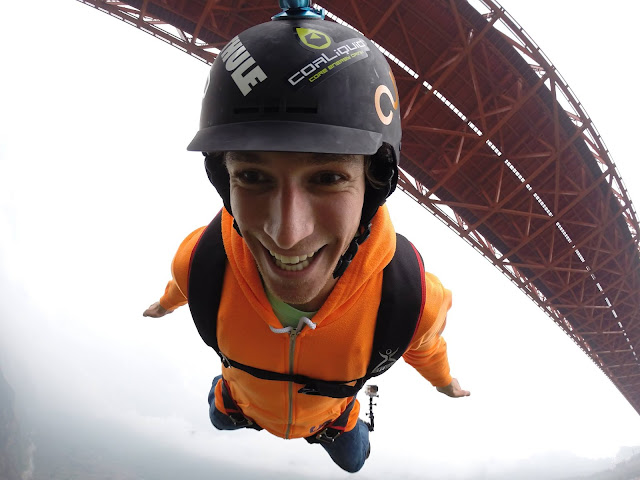
Here are some action shots of me and some of my friends (Professional Athletes) in action!
All photos powered by GoPro HERO3

 Reno Makani

 Bucky Lasek

 Reno Makani

Jamie Sterling

Chad Kagy

Reno Makani

 Shon Bollock

Matthias Giraud

 Matthias Giraud

 Ben Brown

 Reno Makani

 Ben Brown

 Reno Makani

 Reno Makani

 Reno Makani

 Reno Makani

 Jamie Sterling


To all the kids, fans, friends and parents GoPro will be the most requested gift this Christmas so order yours today before they sell out!  
Happy Shopping :) Aloha Reno Makani